Bakery#17Studio
Texture Roller
Print your pattern on a roller or stamp
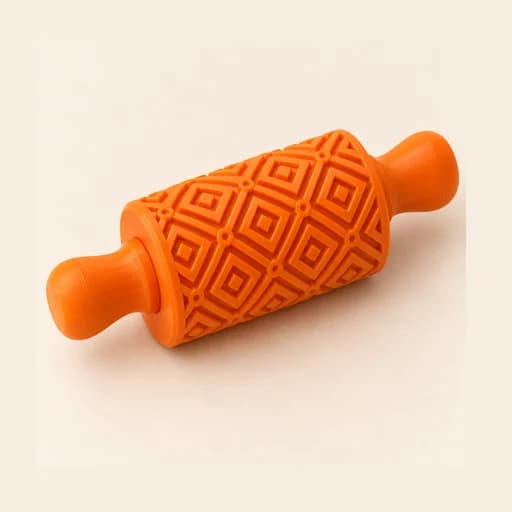
Repeat your drawing, or a pattern from the library, on a roller or a flat stamp pad to texture dough, fondant or clay.
Designing and previewing in 3D is free for every tool. A plan is only needed to download the ones marked Pro or Studio. See plans
Step by step
How it works
Step by step, to the finished piece
Upload the drawing you want to repeat, or pick a library pattern (stripes, zigzag, scales…): those wrap all the way around, with no seam.
Choose roller or flat pad, then set the sizes: the piece, the drawing, and how many times it repeats.
Decide whether the pattern is raised or recessed and how deep, and pick the handle: fork or rolling pin.
Download the STL, print the roller standing on end and make a single pass over the rolled-out dough.
What to watch out for
- With "Raised pattern (emboss)" on, the drawing ends up pressed into the dough; with it off, the drawing stands proud.
- Deep and tightly packed don't mix: if you increase the depth, lower the repeats so the dough has somewhere to go.
What you need
Materials and tools
- A filament (FDM) 3D printer
- PETG filament for dough and fondant; PLA also works for clay
- Dough, fondant or clay, rolled out evenly and chilled
- Cornstarch, powdered sugar or flour so it doesn't stick
Print settings
| Orientation | Standing on end | That's how it arrives in the slicer: it needs no supports, and the layers run around the roller instead of across the drawing. |
|---|---|---|
| Layer height | 0.12 to 0.16 mm | Layer lines get stamped into the dough too: go as fine as you can. |
| Walls | 3 | The relief is almost all wall. |
| Infill | 15% | The roller takes hardly any force: it doesn't need more. |
| Handle | Lying on the bed | It comes in the same STL as the roller: split it off in the slicer and lay it flat. |
| Swappable sleeve | Upright, no supports | Sleeve, core and cap arrive standing on the bed. The clearance isn't print-tested yet: print a short sleeve first. |
When you use it
- Roll the dough out to an even thickness first: any bump or dip shows up later in the pattern.
- Dust the roller before each pass: cornstarch for clay and fondant, flour for cookie dough.
- Make a single firm pass in one direction: if you go back over it, the drawing doubles up.
- Fork: spread the arms slightly and snap one peg into each end of the bore. Rolling pin: slide the axle through the roller and push a grip onto each end.
- With a swappable sleeve: slide the sleeve onto the core, set the cap with its lugs facing the slots and give it a quarter turn clockwise, up to the stop.
- Clean it with a soft, dry brush and don't leave it soaking: water stays trapped between the layers.
Common problems
- The imprint comes out too faint
- Increase the depth (for cookie dough, between 1.5 and 2 mm) and roll with firm, even pressure.
- The dough sticks to the roller
- Dust the roller and chill the dough. If it keeps happening, reduce the depth: a deep relief grips more.
- Fine details get lost
- With a 0.4 mm nozzle, anything narrower than that won't print, and hatching finer than 1 mm clogs up. Raise "Design size" or lower the repeats.
- The pattern fills up with dough
- There's too much relief in too little space. Lower the repeats or the depth, or use a roller with a larger diameter.
- The drawings come out spaced apart
- The roller is bigger than the copies put together. Turn on "Fit the roller to the design": it comes out exactly the size for them to join.
- The sleeve jams or wobbles
- Change "Sleeve clearance": raise it if it jams, lower it if it wobbles. Then reprint only the sleeve: the core and the cap stay the same.
Bakery: other tools
 Cutter
 Cutter + Stamp
 Embosser
 Stamp
Stamp Stencil
 Cake Topper
 Word Mold
 Sandwich
 EjectorPro
 Truffle MoldPro
 Filled KitPro
 Size setPro
 Cake Pop MoldPro
 Dough thickness stripsPro
 Multi-pieceStudio
 Multi-cutterStudio
 Cake scraperStudio
Texture Roller
Repeat your drawing, or a pattern from the library, on a roller or a flat stamp pad to texture dough, fondant or clay.
Open in the designer