Silicone Molds#20Pro
Ice & Chocolate Tray
Multi-cavity tray with your shape: chocolate, ice, gummies
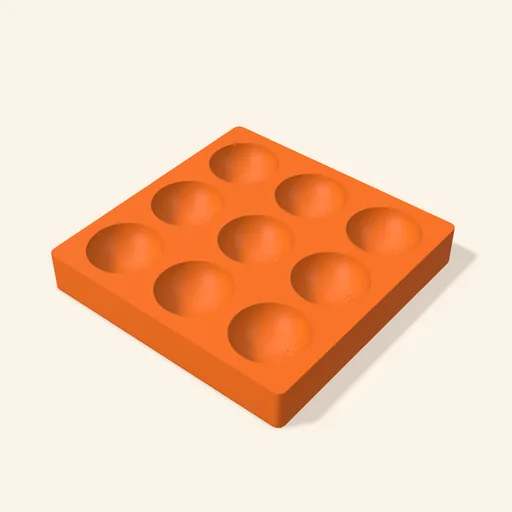
A multi-cavity tray for chocolate, ice, gummies, soap or wax.
Designing and previewing in 3D is free for every tool. A plan is only needed to download the ones marked Pro or Studio. See plans
Step by step
How it works
Step by step, to the finished piece
Choose the cavity shape on its cards: sphere, cube, diamond, heart, star, flower and more.
Set how many rows and columns you want, and the size of each cavity.
Choose the type: rigid to use as is, or a shell for casting a silicone tray.
Print, fill the cavities and demold once it has set.
What to watch out for
- This product doesn't use your image: the shape comes from the figure you pick in the panel or from the 3D model you upload.
- For ice and gummies the flexible silicone tray is the better choice: it demolds far more easily.
What you need
Materials and tools
- A filament (FDM) 3D printer
- PETG filament
- Whatever you're going to mold: chocolate, water, gelatine, soap or wax
- Platinum-cure silicone, only if you choose the flexible tray
Print settings
| Orientation | Cavities facing up | It arrives in the slicer this way and needs no supports: the overhangs of the shape come already filled. |
|---|---|---|
| Layer height | 0.12 to 0.16 mm | Layer lines show on whatever you pour: use the finest you can. |
| Walls | 3 or more | The cavities are mostly wall: with 3 or more the mold ends up closed and even. |
When you use it
- Do not pour anything boiling into the rigid tray: the plastic softens with heat. For very hot mixes, use the flexible one.
- Tap the tray gently on the table to release air bubbles before it sets.
- Wait until it has fully set before unmolding: the rigid tray has angled walls so the piece comes loose, and the flexible one bends.
- With the flexible tray: print the box, pour the silicone until it covers the shapes and wait for the cure the package says.
Common problems
- The piece will not come out of the mold
- Raise the “Cavity draft angle” or switch to the flexible tray, which bends to release the piece.
- The panel says it filled part of the shape
- It is so the piece comes out of the mold. Lower the “Cut offset” and the mouth is the widest part again.
- The piece comes out with layer lines
- Print with a finer layer or sand the cavity: what you pour copies whatever the tray has.
Silicone Molds: other tools
All tools


Ice & Chocolate Tray
A multi-cavity tray for chocolate, ice, gummies, soap or wax.
Open in the designer