Custom#24Studio
Paper Embosser
Dry seal for paper: two magnetic plates that press your design in relief
Two plates that press your logo, text or monogram in relief into paper. They close with magnets or with a hinge that prints already assembled.
Designing and previewing in 3D is free for every tool. A plan is only needed to download the ones marked Pro or Studio. See plans
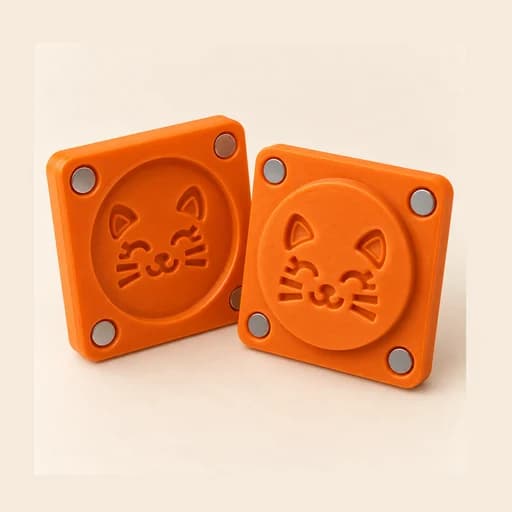
Step by step
How it works
Step by step, to the finished piece
Upload your logo, or type a text or monogram and pick the font.
Choose the closure (magnets or hinge) and set the size of the plates.
Print both plates design side up, no supports: the file already comes out that way.
Place the paper between the plates and press: the design comes out embossed.
What to watch out for
- Test the poles before gluing: the plates must attract, not repel.
- Very thick paper needs more clearance; very thin paper can tear.
What you need
Materials and tools
- A filament (FDM) 3D printer
- PLA or PETG filament
- With magnets: 8 neodymium magnets (4 if you pick 2 per plate)
- Instant glue
- Paper or cardstock
When you use it
- With magnets: stack them before gluing and glue them one at a time, keeping each pair as it was stuck. That way the plates snap together on their own.
- After taking it off the bed, open and close the hinge a few times until it turns freely.
- Lay the paper on the raised plate (the light one) and close the other on top: the design comes out raised on the upper side.
- Press hard and evenly for a few seconds. Works best on 120–300 gsm paper; for thick card, raise the clearance.
Custom: other tools
All tools
Paper Embosser
Two plates that press your logo, text or monogram in relief into paper. They close with magnets or with a hinge that prints already assembled.
Open in the designer