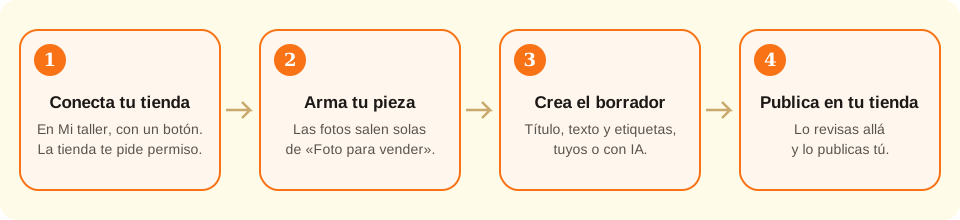
With the Studio plan, connect your Etsy, Shopify, Mercado Libre, Nuvemshop or Pinterest in My workshop. Then, from the designer, “Publish to my store” creates a draft in every store you tick, with photos, text and a preview; you review it and publish it there.
You connect once; after that each piece is published in three taps and always as a draft.
What the connection does and doesn't do
Handled by the site
Stores your store's permission encrypted in your account, so you never paste keys or authorize again each time
Builds the photos of the piece on wood, marble and cream (the “Photo to sell” ones), without AI; and, if you ask for it, “the finished cookie” with AI over the real photo, for 1 credit and labelled as generated
Writes the title, description and tags with AI in your language, for 1 credit, so they fit every store you ticked
Shows the listing preview per store, as the buyer sees it, while you type
Creates the listing as a draft in every store you tick (on Pinterest, a pin on a secret board) and gives you the links to open them
→ Up to you
→Publishing it: you review the draft and activate it in your store; nothing goes live on its own
→Price, stock, shipping and your store's policies: they come from your account there
→The platform's fees: you see and decide them in your store when you publish
→The STL file on Shopify, Mercado Libre and Nuvemshop: there you sell the printed piece; the file is attached only on Etsy
How the connection works
All five platforms work the same way: you go to the platform's page, it asks whether you allow kingscutter.com to create listings in your store, and when you accept it hands us a key. That key is stored encrypted in your account; no password or store key is ever typed on the site.
The key only serves what you asked for: reading your store's name and creating listings. It cannot charge, see your sales or touch listings you made by hand.
Every listing you create from the designer is born switched off: a draft on Etsy, Shopify and Nuvemshop, paused on Mercado Libre, and on Pinterest a pin on a secret board only you can see. So the listing fee, where there is one, is paid when you decide to activate it, not before.
It is part of the Studio plan: connecting stores, creating drafts, the AI text and the finished-cookie photo. On another plan you see the page and the window, which invite you to the plan.
You can disconnect the store whenever you want from My workshop → My stores: the key is deleted. If you also want to remove the permission on the platform's side, that's done from the apps settings of your account there.
1
Connect your store in My workshop
Log in and open My workshop → My stores. You'll see one card per platform. Shopify asks for your store's domain (like mystore.myshopify.com); Mercado Libre and Nuvemshop ask for the country. Etsy and Pinterest ask for nothing.
Tap “Connect”. It takes you to the platform's page, you log in there if needed and accept the permission. You come back to My stores with the store in the connected list. If you don't accept, you come back unchanged.
An Etsy account without an open shop can't be connected: open the shop on Etsy first.
2
Build your piece in the designer
Design as usual: upload the image, pick the product and adjust the measurements. Once the piece is generated, “Publish to my store” shows up under “Sell in series”.
If you want to sell the STL file on Etsy, save the design first (Save to my library): the file is attached to the draft only if the design is saved.
3
Create the drafts
Tick the stores (one or several: a draft is created in each), what you sell (the STL file or the printed piece), the price in each store's currency and, for a printed piece, how many you have. Pinterest has no price: it takes a link to your store.
You write the title, description and tags yourself or ask the AI (“Write with AI”, 1 credit): they come out in your language and trimmed to what every ticked store accepts. You can edit them before creating.
On the right, the preview shows the listing as the buyer sees it in each store (photo, title, price, tags) and changes as you type.
The three photos are built on their own with the piece on wood, marble and cream. If you want, ask for “The finished cookie, with AI” (1 credit): a fourth photo with the piece in use, over the real photo; it comes out labelled as generated and you choose whether to use it. Untick the ones you don't want and tap “Create draft”.
4
Review and publish in your store
When it's done, the site gives you the link to the draft. Open it in your store, check the text, photos and price, fill in whatever your store asks for (shipping, policies, variants) and publish it from there.
My stores keeps the latest listings created, with their status and link.
Quick tips
Save the design before publishing on Etsy as a file: that way the STL travels with the draft and the buyer downloads it from Etsy.
A title that starts with what people search for (“Dog paw cookie cutter”) performs better than one that starts with your brand.
On Mercado Libre the title can't exceed 60 characters: the AI already shortens it; if you write it yourself, count the letters. If you tick Mercado Libre along with other stores, that limit applies to all of them.
If you change the piece, create another draft: the site doesn't edit listings already created.
The finished-cookie photo is an AI illustration: the shape is your piece's, the details are not. Use it as a supporting photo, never as the only one.
Platform
What it asks when connecting
How the listing ends up
What you can sell
Etsy
Nothing: you log in to Etsy
Draft, with photos; STL file attached if digital
The file or the printed piece
Shopify
Your store's myshopify domain
Draft product, with photos and price
The printed piece or the file (you deliver it)
Mercado Libre
Your account's country
Paused listing, with photos, price and description
The printed piece
Nuvemshop
Your store's country
Unpublished product, with photos and price
The printed piece or the file (you deliver it)
Pinterest
Nothing: you log in to Pinterest
Pin on a secret “Drafts” board, with photos and a link to your store
It doesn't sell: it shows the piece and leads to your store
Text
Etsy
Shopify and Nuvemshop
Mercado Libre
Pinterest
Title
up to 140 characters
up to 255
up to 60
up to 100
Tags
up to 13, 20 characters each
up to 20
none
none
Photos
up to 4 from the designer
up to 4
up to 4
up to 4
If something didn't go as expected
The platform's card says “Soon”
That platform isn't enabled on the site yet; the others can be connected
The card says “Studio” and the button is disabled
Publishing to stores is part of the Studio plan: on another plan you see the page, but connecting requires the plan
I came back to My stores with a red notice
Read the notice: it says whether the platform refused the permission, your session ended or you need to retry. Tap “Connect” again
“Publish to my store” is disabled
Generate the piece first: without a piece there are no photos to publish
The window says I haven't connected a store
Connect one in My workshop → My stores and open the window again
The draft came out without the STL file
Save the design to your library and create the draft again, or upload the STL on Etsy by hand
Etsy asks for a shipping profile
Create a shipping profile in your Etsy shop (required for physical items) and create the draft again
Mercado Libre found no category
Change the title to a more direct one (“cookie cutter …”) and try again
Troubleshooting
The platform sent me back to My stores with “the reply didn't match”
Cause:The authorization took more than 10 minutes, was opened in another browser, or the page reloaded halfway.
Fix:Tap “Connect” again and complete the permission in the same tab, without delay.
If it persists:Clear kingscutter.com's cookies, log in again and retry.
My session ended when I came back from the platform
Cause:You logged in to kingscutter.com in a private window, or cookies were cleared while you authorized.
Fix:Log in again and repeat “Connect”.
If it persists:Use a normal browser window, not a private one.
Shopify says the domain isn't valid
Cause:The domain has to be Shopify's technical one, ending in myshopify.com, not your own domain.
Fix:Type just the name (mystore) or the full domain mystore.myshopify.com.
If it persists:You'll find it in Shopify → Settings → Domains.
The AI didn't write the text
Cause:You have no credits left, or the AI didn't answer in time.
Fix:Check your credits in My workshop; if that wasn't it, tap “Write with AI” again or write the text yourself.
If it persists:The credit is refunded on its own when the AI fails; if you don't see it, write to us from Support.
The draft was created but without photos
Cause:The platform rejected a photo or the upload was cut off.
Fix:Open the draft in your store and upload the photos from “Photo to sell” (they download as PNG).
If it persists:Try with fewer photos and create the draft again.
On Mercado Libre the listing stayed active, not paused
Cause:It was created, but the pause couldn't be applied.
Fix:Pause the listing from your Mercado Libre account and review it calmly.
If it persists:Write to us from Support with the listing's link.
I want to remove the permission completely
Cause:Disconnecting in My stores deletes the key on our side; the platform may keep showing the app as authorized.
Fix:In the apps settings of your account (Etsy, Shopify, Mercado Libre, Nuvemshop or Pinterest), revoke kingscutter.com.
If it persists:Without the key on our side, the site can no longer create anything even if the platform lists it.
The window invites me to the Studio plan instead of showing my stores
Cause:Your plan doesn't include publishing to stores, or your Studio expired.
Fix:Upgrade to Studio from Pricing; back in the designer, the window shows your stores.
If it persists:If you already paid for Studio and nothing changes, log out and in again; if it still doesn't, write to us from Support.
The pin doesn't show up on my Pinterest
Cause:It is born on a secret board called “Drafts”, which only you can see.
Fix:Open your secret boards on Pinterest and move the pin to a public board.
If it persists:If the board doesn't exist, the Pinterest account connected wasn't yours: disconnect and connect again.
Frequently asked questions
Do I have to paste my password or a store key?
No. The connection is by permission: you grant it on the platform's page and it hands us a limited key, which we store encrypted.
Does it publish on its own?
No. It always stays a draft (paused on Mercado Libre; on Pinterest, on a secret board). You review it and publish it in your store.
Which plan is it in?
Studio. On another plan you can open the window and the My stores page, but connecting stores, creating drafts and asking the AI require the plan.
How much does it cost?
Connecting and creating drafts uses no credits. Writing the text with AI costs 1 credit per listing, and the finished-cookie photo 1 credit per photo. Each platform's fees are the usual ones and you see them when you publish there.
Can I publish to several stores at once?
Yes: in the window you tick the stores you want and a draft is created in each one, with the same text and photos; you set the price per store, in its currency. On Shopify and Nuvemshop you can connect several stores.
What does Pinterest do if it doesn't sell?
It shows your piece and leads to your store: the pin goes out with the photos, the title, the description and the link you choose (by default, your connected store). It is born on a secret board and you make it public whenever you want.
What does the site see of my store?
The store's name and address, and the listings the site itself created. It doesn't see your sales or your customers.
Is the STL file uploaded to my store?
Only on Etsy, in a digital listing, and only if the design is saved in your library. On the other platforms you sell the printed piece; you deliver the file yourself.
What happens if I disconnect the store?
The key is deleted. Listings already created stay in your store, like any other.
Ready to make yours?
Upload your image and get a print-ready STL in seconds.